Posts
System Boot
What Actually Happens When A System Boots Up
On This Page
This will be a post on what actually happens when a system boots up.
When system boots up motherboard first checks if all necessary components are attached or not. If they are not then it shows it’s tantrums that one needs to debug. Motherboard first initialises it’s firmware, i.e the chipset and other things needed for normal startup.
Then the control is sent to the bootloader that is responsible for further initialisation of kernel which ultimately loads the complete OS. If on a multicore processor, one of the core is chosen dynamically (the bootstrap processor : BSP) and is given the responsibility to run the code for bootloader and kernel. The remaining cores remain halted unless being used explicitly by kernel or bootloader.
Due to the backwards compatibility of Intel CPUs, they boot into real addressing mode. In real mode, programs can access only 1 MB of memory and this 1 MB memory can be accessed by any program running. All addresses are real and not virtual (starting from 0 with an offset) and because of this, the mode is named real mode.
Here are a few lines of wisdom taken from osdev discord written by mintsuki. She wrote the bootloader we will be using in our osdev journey.
- so, in x86 you have 6 special registers called “segment registers”
- whenever you want to access memory in ANY way (including instruction fetching) the access has to occur via a segment register
- the segment registers are: cs, ds, es, fs, gs, and ss. some of them have special meanings.
- cs is the code segment, it is used for instruction fetching, always, can’t be overridden
- ds is the data segment, it is used by default whenever you access data, with some exceptions, you have to check the specific instruction to know for sure - this can be overridden so you can use another segment instead, most of the time
- es is another segment that some instructions use by default. otherwise it is general purpose, meaning you can use it by overriding the default segment in other instructions
- fs and gs are purely general purpose
- ss is always used when pushing and popping from the stack, since it’s the stack segment. it is also used when accessing memory via the bp register, usually for walking stack frames
now, a segment register is composed of several parts - you can only access a small 16 bit window called the “visible part”, which is used to alter the contents of the whole segment register. the rest is called the “hidden part” or “segment register descriptor cache”, either name is ok.
the hidden part contains information about the segment such as where it starts in linear memory (the .base component), the size of it (or last accessible byte in the segment) (the .limit component), and some other flags which i won’t explain here but they basically determine whether a segment has certain permissions and whatnot
the visible part allows you to load the hidden part. in Real mode, you write a real address, shifted right by 4 (divided by 16) in the visible part. when this is done, the CPU will compute on the fly the .base component as the visible part multiplied by 16. the limit and flags are untouched, and this is why stuff like “unreal mode” is possible
the visible part, in protected mode, is loaded by writing a “selector” to it; which is a 16 bit structure containing an index into the GDT or LDT, another bit telling it whether you wanna use the GDT or LDT, and the requested privilege level (which i won’t get into right now) when loaded, this selector makes the CPU access the given table (GDT or LDT) and load the descriptor thereof into the hidden part of the segment register. The descriptor contains the base, limit and all, allowing you to more finely modify those values than in real mode
“Real addressing is a legacy-mode form of address translation used in real mode. This simplified form of address translation is backward compatible with 8086-processor effective-to-physical address translation. In this mode, 16-bit effective addresses are mapped to 20-bit physical addresses, providing a 1 MB physical-address space.”
Most registers in CPU have a well defined value after a reset (or power up). This includes the EIP (extended instruction pointer) which holds the address of next instruction to be executed. Modern Intel CPUs when initialise use a base address + offset address method which is applied on EIP in such a way that the first instruction it executes will be at 0xfffffff0. This is 16 bytes less than 4 GB memory. This address is called the reset vector as this is the vector that decides what our CPU will do next and is only used at system reset.
The motherboard makes sure that instruction at the reset vector is a jmp instruction that jumps directly to BIOS entry point. The control of the system is now in the capable hands of your system’s BIOS (Basic Input/Output System). This also clears the hidden base address that was initialised at power up so that from now on program executes instructions from exactly where it wants to using the EIP.
](bootMemoryRegions.png "regions with their usage — image stolen from [here](https://manybutfinite.com/post/how-computers-boot-up/)") |
| regions with their usage — image stolen from here |
The CPU then starts executing BIOS code which stats the POST (Power On Self Test) which basically checks for all necessary components for computer to boot up and whether they are working properly or not. Modern BIOS that use ACPI (Advanced Configuration & Power Interface). Modern operating systems can use this standard to detect connected hardware components. This can be used when operating system is trying to manage power.
BIOS now searches for an initializer code that it can give control to. This search is configurable (in sense that which storage device is scanned first). Usually it is found in first 512 byte secto (sector 0) of HDD. This sector is called the MBR (Master Boot Record). MBR contains the initializer code that will jump to our bootloader.
](masterBootRecord.png "taken from [here](https://manybutfinite.com/post/how-computers-boot-up/)") |
| taken from here |
There are several other modes except real addressing modes.
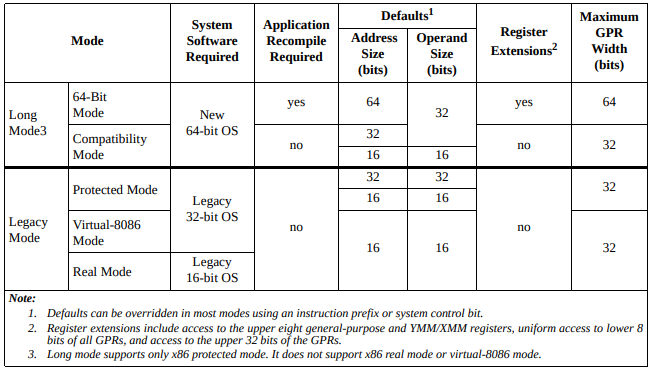 |
| taken from amd architecture programmer manual volume 2 |
The main difference between all these modes is how the allow programs to access memory and how much memory is accessible.
Long mode consists of two submodes: 64-bit mode and compatibility mode. 64-bit mode supports several new features, including the ability to address 64-bit virtual-address space. Compatibility mode provides binary compatibility with existing 16-bit and 32-bit applications when running on 64-bit system software. Before enabling and activating long mode, system software must first enable protected mode.
Information about other modes can be found in amd64 architecture programmer manual here.
Eventually control reaches to the kernel. Kernel is responsible for further bootup process. When we make our own kernel from scratch, we don’t have most of the featuers. We don’t even have a way to print anything on screen! We can’t use malloc, calloc or any other function that is used to dynamically allocate memory in programs because that is actually done by kernel and we don’t have code for that in the kernel now. We don’t have any GUI, any multi-tasking features, any memory management, any network connection or even a driver, any way to use keyboard, mouse or anything. We’ll have to write our own driver code for all these things! In layman terms, our kernel will be void of everything and we’ll have to implement everything! Everything here means everything! you name it!